
Blog
Mesh Nest blog
News, notes, and updates from the studio.
Latest posts
Browse articles and announcements.

DIY: Get a Phone Alert When Your Geyser Leaks, with a Zigbee Water Sensor and Home Assistant
Put a small Zigbee water leak sensor in your geyser's drip tray and under the sinks, and let Home Assistant send a loud phone alert the moment it gets wet, so a leak is a quick fix and not a ceiling repair.

DIY: Run Your Pool Pump and Pool Light on a Smart Schedule with Home Assistant (Shelly or Sonoff)
Put your pool pump on a smart relay, either a Shelly or a two-channel Sonoff Dual R3 that also handles the pool light, give it a weekly schedule in Home Assistant, and run it in the sunniest hours so it uses your solar instead of the grid, with power monitoring and an alert if it stops.

DIY: Monitor Your Water Tank Level in Home Assistant with ESPHome
Put a cheap ESP32 and an ultrasonic sensor on your backup water tank, flash it with ESPHome, and get the tank level in Home Assistant plus a phone alert before it runs dry during a water outage.

DIY: Watch Your Inverter Battery in Home Assistant with SolarAssistant
Bring your hybrid inverter and battery into Home Assistant with SolarAssistant's official integration, light up the Energy dashboard, and get a phone alert before the battery runs flat during load shedding.

DIY: Schedule and Shed Your Electric Geyser with Home Assistant
Keep a big SA electric geyser off overnight and during peaks with a Home Assistant Schedule helper—then optionally shed it when your load-shedding area sensor flips on.

DIY Load-Shedding Schedule in Home Assistant with EskomSePush
Pull your area’s EskomSePush schedule into Home Assistant with WernerHP’s Load Shedding integration—then trigger 15-minute warnings and start/end automations without burning the free API quota.

DIY Zigbee2MQTT USB Coordinator Setup for Home Assistant
Set up a USB Zigbee coordinator with Zigbee2MQTT and Mosquitto so your sensors and switches stay local—useful when Wi‑Fi and cloud apps wobble during load shedding.

DIY UPS Monitoring with NUT and Home Assistant for Load Shedding
Wire a USB UPS into Home Assistant with Network UPS Tools (NUT) so you get real on-battery alerts, battery-charge automations, and graceful load shedding—not just a schedule guess.

DIY Load-Shedding Ready Smart Plugs with Home Assistant
Build a practical, local-first smart-plug setup that sheds non-essentials before and during outages—using Home Assistant, schedule sensors, and optional UPS monitoring.

DIY Home Automation: How to Build a Smarter Home Without Breaking the Bank
Want a smarter home without expensive proprietary systems? This practical guide walks you through starting a DIY home automation setup using open-source tools, affordable hardware, and a clear step-by-step approach.
DIY: Get a Phone Alert When Your Geyser Leaks, with a Zigbee Water Sensor and Home Assistant
DIY: Get a Phone Alert When Your Geyser Leaks, with a Zigbee Water Sensor and Home Assistant
Put a small Zigbee water leak sensor in your geyser's drip tray and under the sinks, and let Home Assistant send a loud phone alert the moment it gets wet, so a leak is a quick fix and not a ceiling repair.
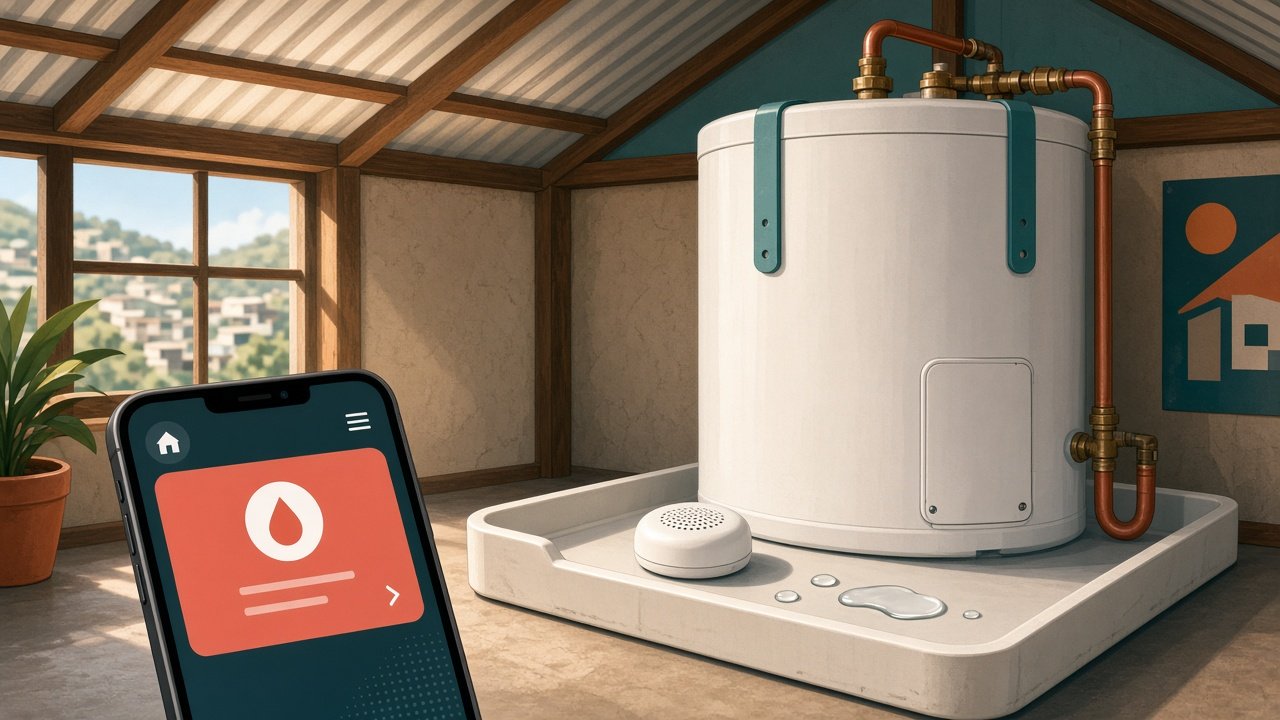
Most South African homes have the geyser in the roof, sitting in a drip tray that is meant to catch a slow leak and drain it outside. In practice the drain pipe gets blocked, the tray overflows, and the first sign of trouble is a brown stain on the ceiling or water coming through a light fitting. By then the damage is done, and you are on the phone to the plumber and the insurer.
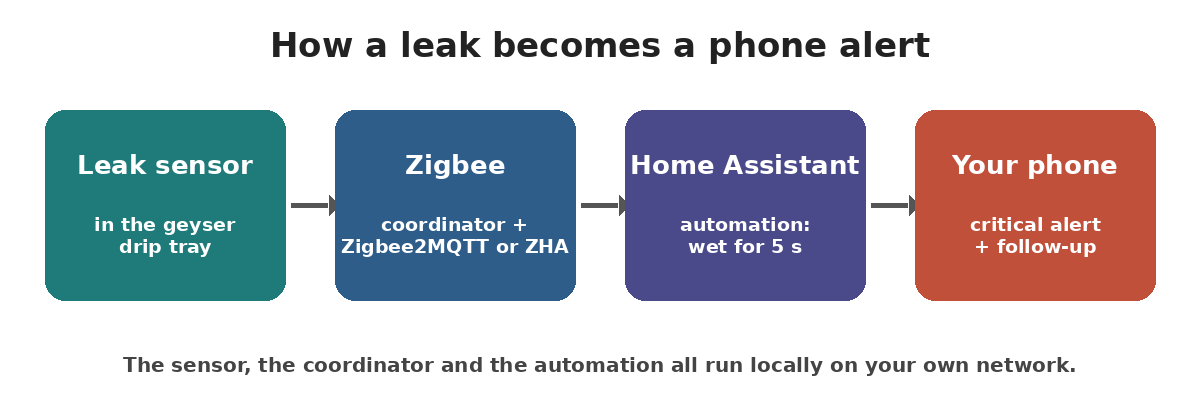
A small battery-powered Zigbee water leak sensor fixes the "nobody noticed" part. Put one in the drip tray, and others under the kitchen sink, behind the washing machine and next to the dishwasher. When water touches the sensor, Home Assistant sends a loud alert to your phone within seconds, even if you are at work or asleep. It costs far less than a ceiling, and it is an easy weekend job with no mains wiring.
What you need
- A Zigbee coordinator already working with Home Assistant, through Zigbee2MQTT or ZHA. If you do not have one yet, start with our Zigbee2MQTT guide (https://meshnest.co.za/blog/diy-zigbee2mqtt-usb-coordinator-home-assistant).
- One or more Zigbee water leak sensors. This post uses the Aqara Water Leak Sensor (model SJCGQ11LM) as the example because it is well supported. Its Zigbee2MQTT device page (https://www.zigbee2mqtt.io/devices/SJCGQ11LM.html) lists a water_leak state, battery level, a battery_low flag and a CR2032 coin cell. Other brands work the same way; check that your model is on the Zigbee2MQTT supported devices list first.
- The Home Assistant Companion app on your phone for the alerts.
- A Zigbee router near the roof if your geyser is far from the coordinator. Any mains-powered Zigbee device, like a smart plug, acts as a router and extends the network.
Step 1: Pair the sensor
In Zigbee2MQTT, click Permit join. In ZHA, go to the Zigbee integration and choose Add device. Then, according to the Zigbee2MQTT device page, press hard on the top of the Aqara sensor (the water-drop logo) for about five seconds until the blue light starts blinking, and it joins on its own.
Pair it on your desk first, then take it to the roof. The Zigbee2MQTT notes say a sensor that pairs right next to a router may still be unreliable at its final spot, so test it where it will live (Step 3). Rename it to something clear, such as Geyser leak, because Home Assistant builds entity names from it. With Zigbee2MQTT you should then get binary_sensor.geyser_leak_water_leak and binary_sensor.geyser_leak_battery_low. Check the real names on the device page in Home Assistant and use those in the examples below.
Step 2: Place it where water collects first
- Geyser drip tray: put the sensor flat on the lowest point of the tray, away from the drain outlet, so it gets wet before the tray overflows. Keep it clear of the hot pipes and the element cover.
- Kitchen and bathroom sinks: on the floor of the cupboard, under the waste trap and the tap connections.
- Washing machine and dishwasher: on the floor behind the machine, near the inlet hose.
Roof spaces get very hot in summer, so check your sensor's operating temperature range in its manual before you leave it up there.
Step 3: Test it with a damp cloth
Once it is in place, touch the contacts on the bottom with a wet cloth or put it on a wet paper towel. In Home Assistant, the water leak entity should change to Wet within a few seconds, and go back to Dry after you wipe it. If nothing happens, your sensor is probably out of Zigbee range, so add a router closer to the roof hatch and test again.
Step 4: Send a critical alert to your phone
A normal notification is easy to miss at 2 am. The Companion app supports critical notifications (https://companion.home-assistant.io/docs/notifications/critical-notifications/), which on iPhone play a sound even when the phone is on silent or Do Not Disturb. On Android, the same docs say priority: high and ttl: 0 make the alert arrive straight away instead of waiting for the screen to wake. This automation does both, and fires when any listed sensor has been wet for five seconds:
alias: "Water leak alert"
mode: single
triggers:
- trigger: state
entity_id:
- binary_sensor.geyser_leak_water_leak
- binary_sensor.kitchen_sink_leak_water_leak
to: "on"
for: "00:00:05"
actions:
- action: notify.mobile_app_your_phone
data:
title: "Water leak!"
message: "{{ trigger.to_state.name }} is wet. Go and check it now."
data:
push:
interruption-level: critical
ttl: 0
priority: high
Replace notify.mobile_app_your_phone with your own phone's notify action, and add a second notify action if someone else at home should get it too. Add more sensors to the entity_id list as you buy them.
Step 5: Do not let a flat battery switch it off
A leak sensor with a dead battery is worse than none, because you think you are covered. The Aqara sensor reports a battery_low flag, so this second automation tells you when it is time to change the coin cell:
alias: "Leak sensor battery low"
triggers:
- trigger: state
entity_id:
- binary_sensor.geyser_leak_battery_low
- binary_sensor.kitchen_sink_leak_battery_low
to: "on"
actions:
- action: notify.mobile_app_your_phone
data:
title: "Leak sensor battery"
message: "{{ trigger.to_state.name }}: time for a new CR2032."
It is also worth adding the leak sensors to a dashboard card, so you can see at a glance that all of them read Dry and none are unavailable.
Going further
- Shut the water off automatically. Some motorised valves can be controlled from Home Assistant. Fitting one on your main water line is plumbing work, so get a plumber to install it and test it.
- Cut the geyser element. If you followed our geyser schedule guide (https://meshnest.co.za/blog/diy-geyser-schedule-home-assistant), you can add an action that turns the geyser switch off when its drip tray is wet, so you are not heating water that is leaking out.
- Flash a light. Turn a passage light red or flash it, so people at home notice even without their phones.
Troubleshooting
- Sensor shows unavailable. Battery sensors sleep most of the time and only check in now and then, but long gaps usually mean a weak signal. Add a Zigbee router between the coordinator and the roof.
- It will not pair. The Zigbee2MQTT page suggests holding the button until it flashes, waiting a second, then pressing it twice quickly, or removing the battery and holding the button while you put it back.
- Alert came through but was silent. On iPhone, allow critical alerts for the Home Assistant app in the phone's notification settings. On Android, see the notification channel section of the critical notifications docs.
Sources
- Zigbee2MQTT, Aqara SJCGQ11LM water leak sensor: https://www.zigbee2mqtt.io/devices/SJCGQ11LM.html
- Zigbee2MQTT Home Assistant integration: https://www.zigbee2mqtt.io/guide/usage/integrations/home_assistant.html
- Home Assistant ZHA integration: https://www.home-assistant.io/integrations/zha/
- Home Assistant Companion app critical notifications: https://companion.home-assistant.io/docs/notifications/critical-notifications/
- Home Assistant automation triggers: https://www.home-assistant.io/docs/automation/trigger/